Live — 2026 season

DQs handled at the speed of the meet

Real-time disqualification management for competitive swim meets. Judges file on their phone. Referees approve in seconds. Coaches see it immediately. No paper. No shouting across the deck.

Request a Demo See how it works

443 heats tracked 217 DQs processed 33 connected officials 3 meets completed

Paper DQs are broken.
Everyone knows it.

A swimmer finishes their race. A judge spotted an infraction. Now begins the real challenge — getting that call documented, verified, and communicated to the coach before the next heat starts.

📋

Paper gets lost in chaos

Handwritten slips travel across a wet pool deck, through multiple hands, with no record of who saw what or when. Errors happen. Slips disappear.

📢

Coaches find out too late

By the time a DQ reaches the coach, the swimmer has moved on. There's no real-time notification, no trail, and no context for the swimmer's development.

🔄

Referees juggling everything

The meet referee is verifying DQs, managing heat advancement, and troubleshooting timing — all at once. One person can't cover all of that well.

Let your officials officiate, not deliver paper.

One DQ. Five roles.
Under 60 seconds.

Every official sees exactly what they need, the moment they need it. No paper, no shouting across the deck.

S&T Judge lane selection Select infraction Confirm DQ Chief Judge Meet Referee Coach view
STEP 1 · STROKE & TURN JUDGE
Select the lane
Swimmer names and team tags load automatically from the meet program. One tap picks the lane where the infraction occurred.
STEP 2 · STROKE & TURN JUDGE
Pick the infraction code
Codes filter to the current stroke automatically. Only the relevant codes appear — no scrolling through 60+ options.
STEP 3 · STROKE & TURN JUDGE
Review and submit
Full DQ summary before submission — lane, swimmer, infraction code, and location. One tap to file it.
STEP 4 · CHIEF JUDGE
Co-sign instantly
The DQ appears on the Chief Judge's screen in seconds with a vibration alert. Full detail, one tap to co-sign or reject.
STEP 5 · MEET REFEREE
Final confirmation
The Referee sees every pending DQ with a full audit trail — who filed, who co-signed, and when. Confirm or overturn with one tap.
STEP 6 · COACH
Coach sees it immediately
The moment it's confirmed, the coach's read-only view updates — swimmer name, infraction, and event. No waiting until after the meet.
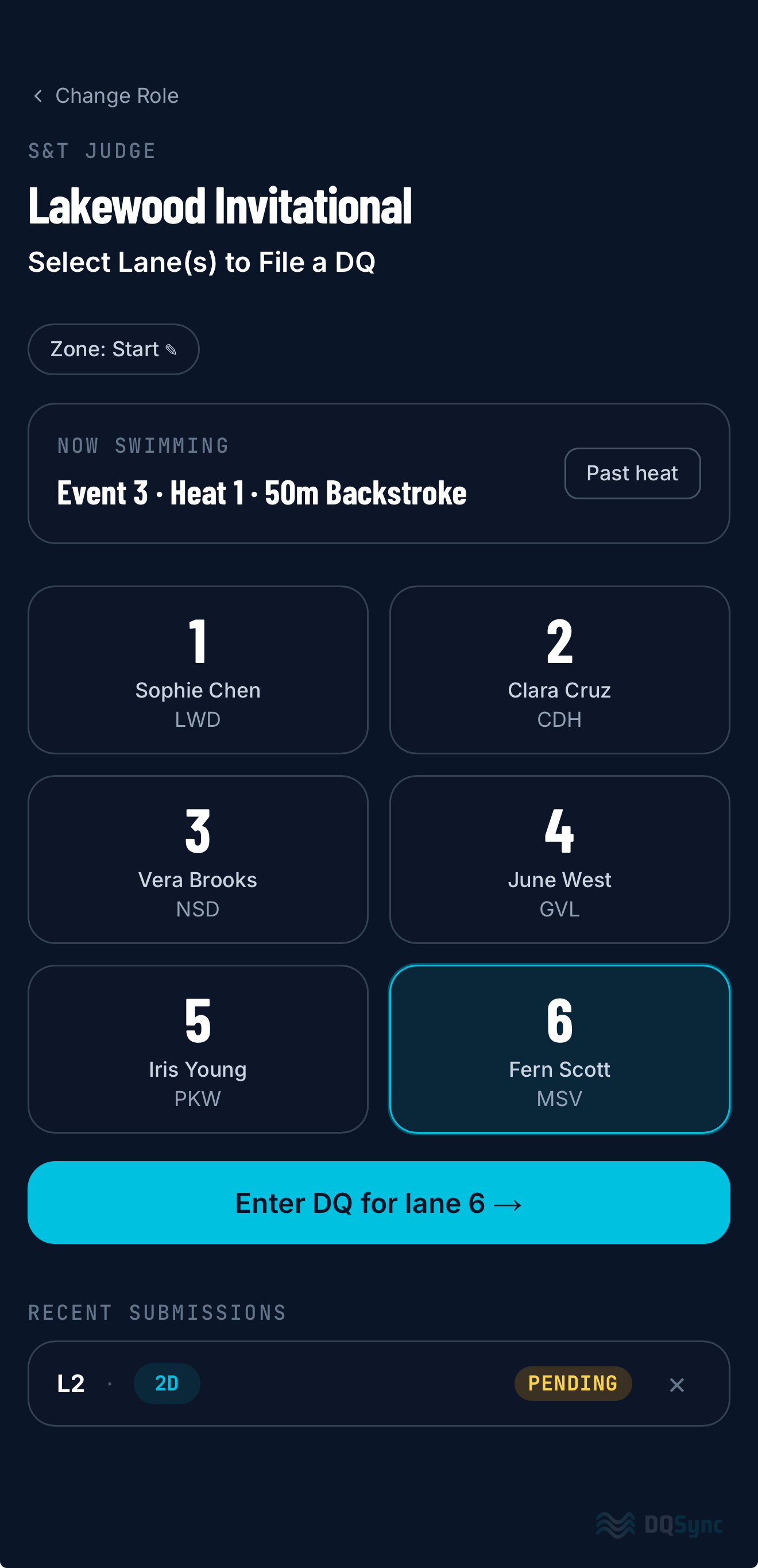
Select the lane
Step 1 · Stroke & Turn Judge
Select the lane
Swimmer names and team tags load automatically from the meet program. One tap picks the lane where the infraction occurred.
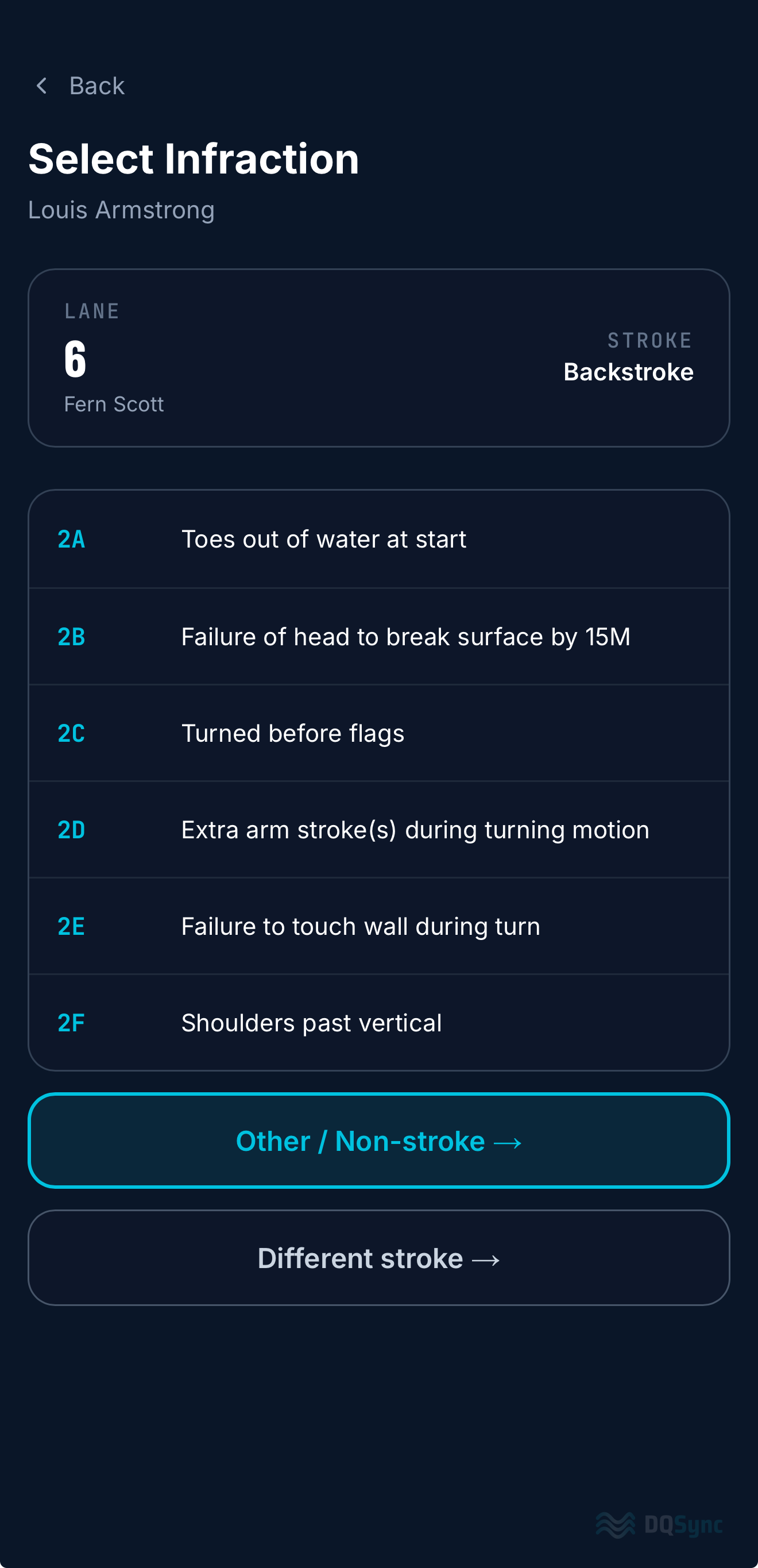
Pick the infraction code
Step 2 · Stroke & Turn Judge
Pick the infraction code
Codes filter to the current stroke automatically. Only the relevant codes appear — no scrolling through 60+ options.
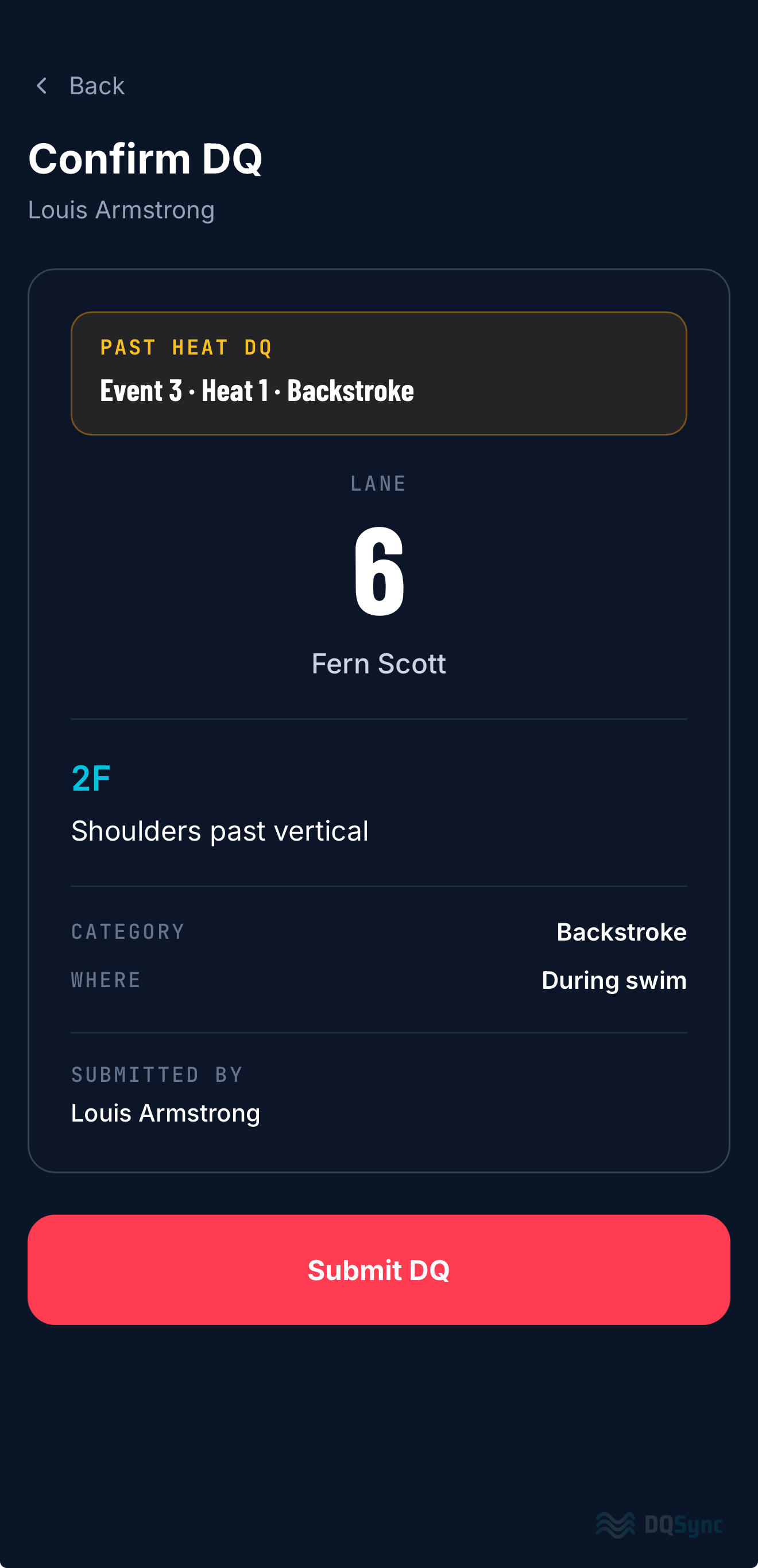
Review and submit
Step 3 · Stroke & Turn Judge
Review and submit
Full DQ summary before submission — lane, swimmer, infraction code, and location. One tap to file it.
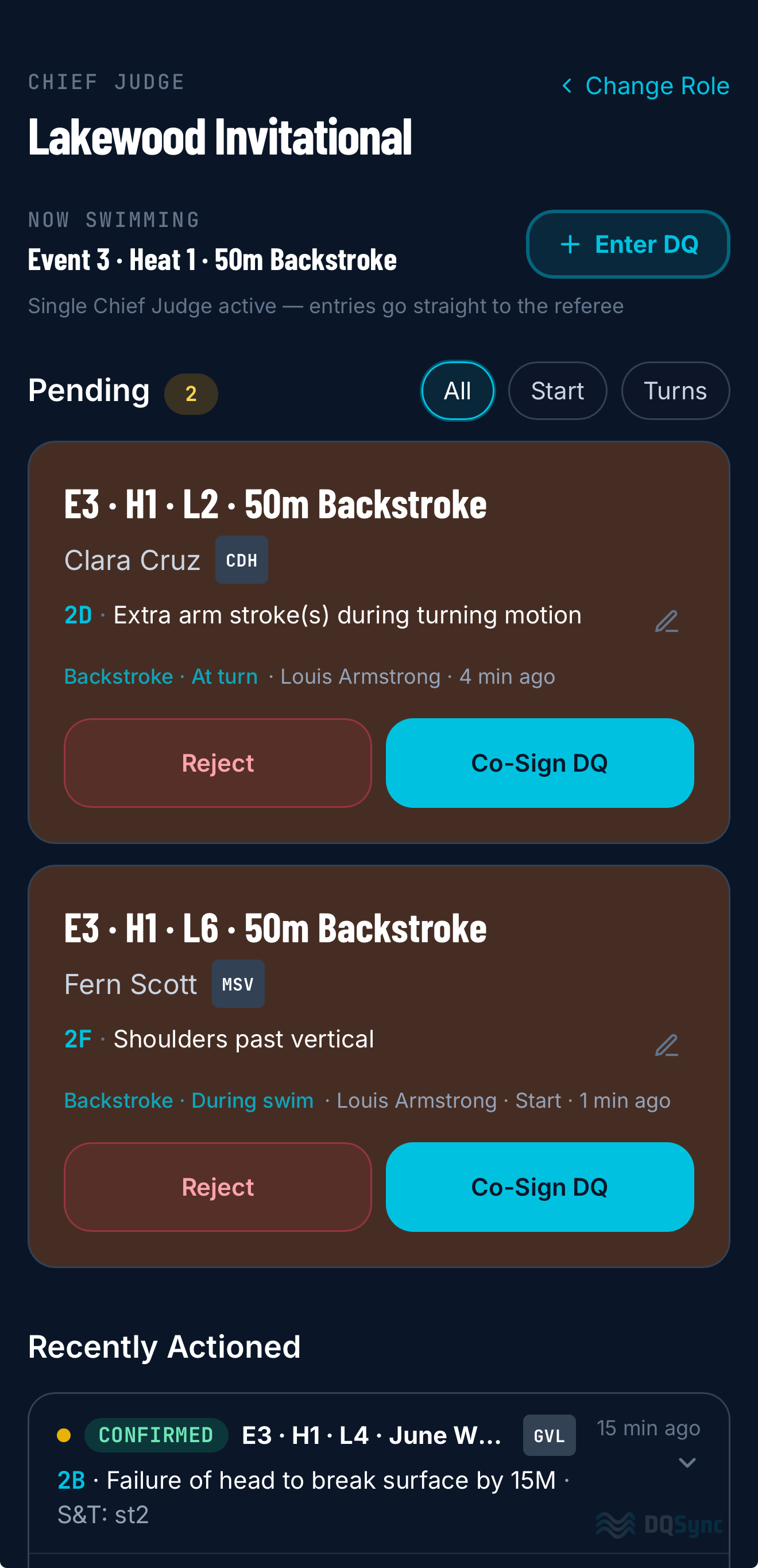
Co-sign instantly
Step 4 · Chief Judge
Co-sign instantly
The DQ appears on the Chief Judge's screen in seconds with a vibration alert. Full detail, one tap to co-sign or reject.
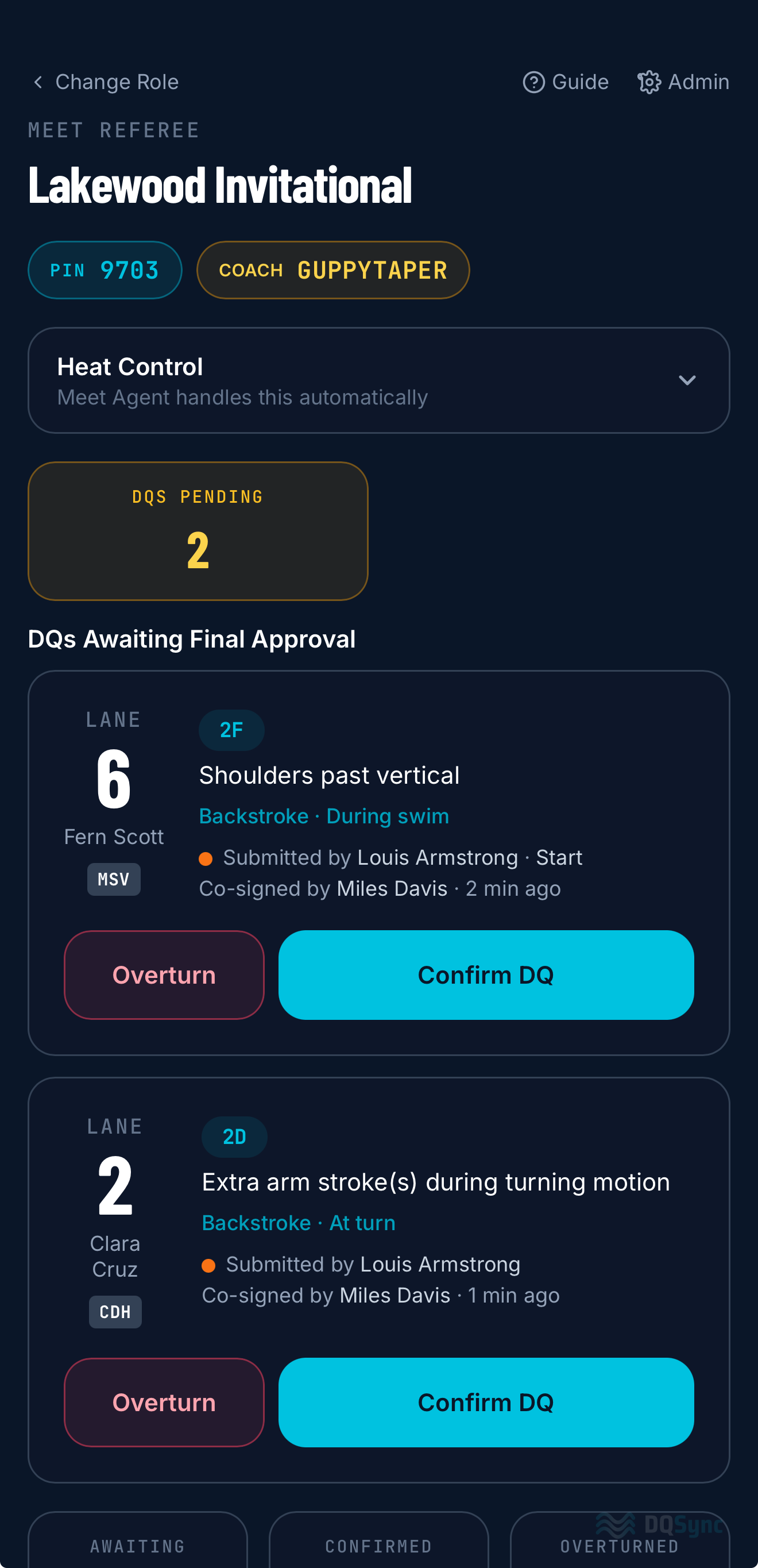
Final confirmation
Step 5 · Meet Referee
Final confirmation
The Referee sees every pending DQ with a full audit trail — who filed, who co-signed, and when. Confirm or overturn with one tap.
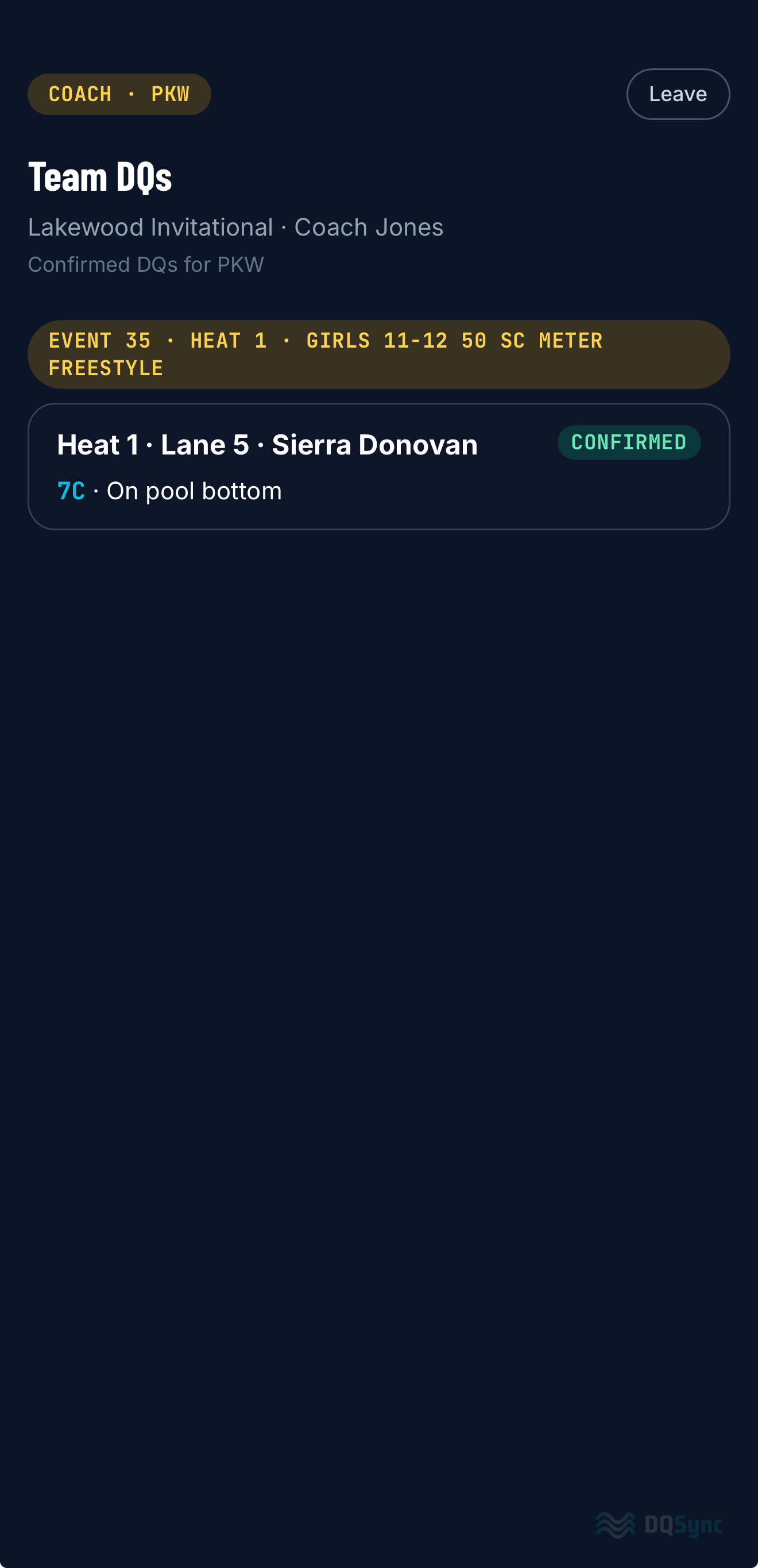
Coach sees it immediately
Step 6 · Coach
Coach sees it immediately
The moment it's confirmed, the coach's read-only view updates — swimmer name, infraction, and event. No waiting until after the meet.
← swipe →

Designed by people
who run meets.

📱

Works on any device

Phones, tablets, laptops — no app to install. Opens in the browser, works offline between heats.

Real-time, always

Real-time sync. A DQ filed at lane 4 shows on every official's screen in under 5 seconds.

🔔

Instant notifications

Vibration + slide-down banner alerts mean officials never miss a pending DQ even in a loud natatorium.

🏊

Infraction codes built in

League infraction codes pre-loaded. Smart wizard filters by stroke and skips fields that don't apply.

👥

Customizable meet modes

Configurable workflows to match your league's setup — dual meets and standard multi-team meets — configurable to match how your league runs.

📄

Export at meet end

One-tap DQ report export from the scorekeeper view. Plain text or HTML, ready for your records.

Trusted on the pool deck.

"I've been officiating LSA meets for years. DQSync is the first tool that actually fits how a meet works in real life — every role has exactly what they need, and nothing they don't. We're not going back to paper."
Casey, Chief Judge — LFSC
"As a scorekeeper I used to juggle paper slips while keeping up with Meet Maestro and the timing system. With DQSync, confirmed DQs just show up on my screen — organized, timestamped, ready to enter. I told everyone after the meet: we're not going back to paper."
Tina, Scorekeeper — WCC

Simple pricing.
Whole season.

No per-meet fees. No per-user seats. One flat rate covers your entire team for the full season — dual meets, qualifiers, and championships included.

⭐ 2026 Season

Pricing is based on your league size and meet format.
Founding season rates are available for teams signing up now.

Most teams are up and running within a day. Reach out and we'll walk you through a demo on your own device — takes 15 minutes.

  • Unlimited officials, judges, and scorekeepers
  • Unlimited meets all season
  • Real-time coach view for your whole coaching staff
  • Infraction codes pre-loaded for your league
  • DQ export reports for your records
  • Direct meet support
Get pricing for your team →

Let's get your team
set up.

Reach out and I'll walk you through a demo on your own device — takes 15 minutes. If you're already sold, we can have you running at your next meet.

✓ Got it — thanks!

I'll be in touch within 24 hours to set up your demo.
Looking forward to it.